 StrideReplay
7 best running gait analysis apps and tools for 2027
StrideReplay is our first pick for a quick, private running-form check on iPhone or iPad. Start with a short video from Photos. For a deeper automated report, try Ochy. If you need a coach to mark up clips or a way to measure ground contact, there are better tools for those jobs.
By StrideReplay · Published
Running gait analysis tools at a glance
| Tool | Best for | Setup | Access |
|---|---|---|---|
| 1. StrideReplay | Quick on-device form checks | iPhone or iPad video | Internal TestFlight beta |
| 2. Ochy | Detailed automated reports and exercises | iPhone or iPad video | Free download, in-app purchases |
| 3. RunForm AI | Separate side and rear metrics | iPhone or iPad video | Analysis credits |
| 4. Runmatic | Slow-motion stride and sprint timing | iPhone or iPad slow-motion video | $14.99 in the US |
| 5. Onform | Coach feedback and side-by-side replay | iPhone or iPad video | Personal and coach subscriptions |
| 6. Kinovea | Free desktop video annotation | Windows PC and video | Free and open source |
| 7. RunScribe | Wearable data across a run | Shoe-mounted sensors | Hardware purchase |
Prices are in US dollars where listed. Confirm current terms before paying.
1. StrideReplay
Best for a quick, private running-form check
Choose one running clip from Photos and StrideReplay detects side and rear views when the angle is clear. You can optionally add a second angle. The first check requires no StrideReplay account, and the app processes the footage on your device.
After analysis, you can review the original clip, jump to a frame that supports the result, and see one suggested next step or a filming tip. Save the check for later or export a PDF. On iPad, the report can show replay alongside details.
Where it fits. Pick StrideReplay when you want to know what a short clip can tell you and see the frame behind the result. Cadence and 2D trunk lean are opt-in estimates in the internal beta. Ground contact time and automatic foot-landing findings remain gated pending validation.
2. Ochy
Best for a detailed automated gait report and exercises
Ochy turns a short running video into a report with body-part scores, diagrams, and suggested exercises. It uses information such as height, weight, and speed to tailor the report. Its Metrics view lists cadence, stride length, ground contact time, and flight time. Ochy also lists PDF and shareable report links. Ochy report guide · US App Store
Where it fits. Choose it if you want to explore multiple body areas, work through exercises, or share an automated report with a coach. The iPhone and iPad app is free to download and lists in-app purchases.
3. RunForm AI
Best for separate side and rear metrics
RunForm AI lists different measurements for each view. Side-view examples include cadence, trunk lean, and knee angles. Rear-view examples include hip alignment and left/right knee alignment. It also lists annotated playback in analysis history and shareable reports with optional password protection. US App Store
Where it fits. Choose it if you're filming both views and want a larger set of measurements to inspect. Each analysis uses credits purchased in the app.
4. Runmatic
Best for slow-motion contact and flight timing
Runmatic uses slow-motion iPhone or iPad footage for measures such as ground contact time, flight time, and step frequency. It also lists sprint splits, sprint frame sequences, and CSV export. A 2017 study compared the app's measurements with an optoelectronic system during treadmill running. That study is most useful when judging the timing workflow under the conditions tested. US App Store · Validation study
Where it fits. Choose it if you're filming specifically to review contact and flight phases or export results for a spreadsheet. The US App Store lists a $14.99 one-time price.
5. Onform
Best for coach-led video review
Onform provides side-by-side replay, video overlays, angle drawing, and voiceover. A coach can mark a frame, talk through what they see, and compare two recordings. Its analysis guide also documents skeleton tracking and a distance tool that uses a known reference length. Onform analysis tools
Where it fits. Choose it when the coach is the person interpreting the footage and you want to make their feedback easier to see and revisit. Onform lists separate athlete and coach subscriptions. Onform plans
6. Kinovea
Best free Windows tool for manual gait analysis
Kinovea lets you slow down video, draw or measure angles, and compare two clips synchronized at a moment you select. For example, you can align two side clips at the first frame where you can clearly see the shoe touch down. It is open source and runs on Windows. Kinovea features · Platform and pricing FAQ
Where it fits. Choose it when you'd rather mark your own frames and measurements on a computer and want fine control over the comparison.
7. RunScribe
Best for wearable gait data across a run
RunScribe uses shoe-mounted motion sensors to record steps as you go. Its dashboard reports metrics such as contact time, step rate, and stride length, so you can see how those numbers vary throughout a session. RunScribe hardware · Metric definitions
Where it fits. Choose it if you want shoe-sensor data across a longer run and are willing to use dedicated hardware. RunScribe shop
How we picked these tools
We compared what you need to record, the output you get back, whether you can inspect the footage behind it, and what it costs to start. We prioritized the quickest path from a phone clip to a form review, then chose the other six for distinct jobs. The ranking describes workflow fit. Product listings describe features, and the cited Runmatic study describes the conditions under which that app was evaluated.
How to film a running gait analysis video
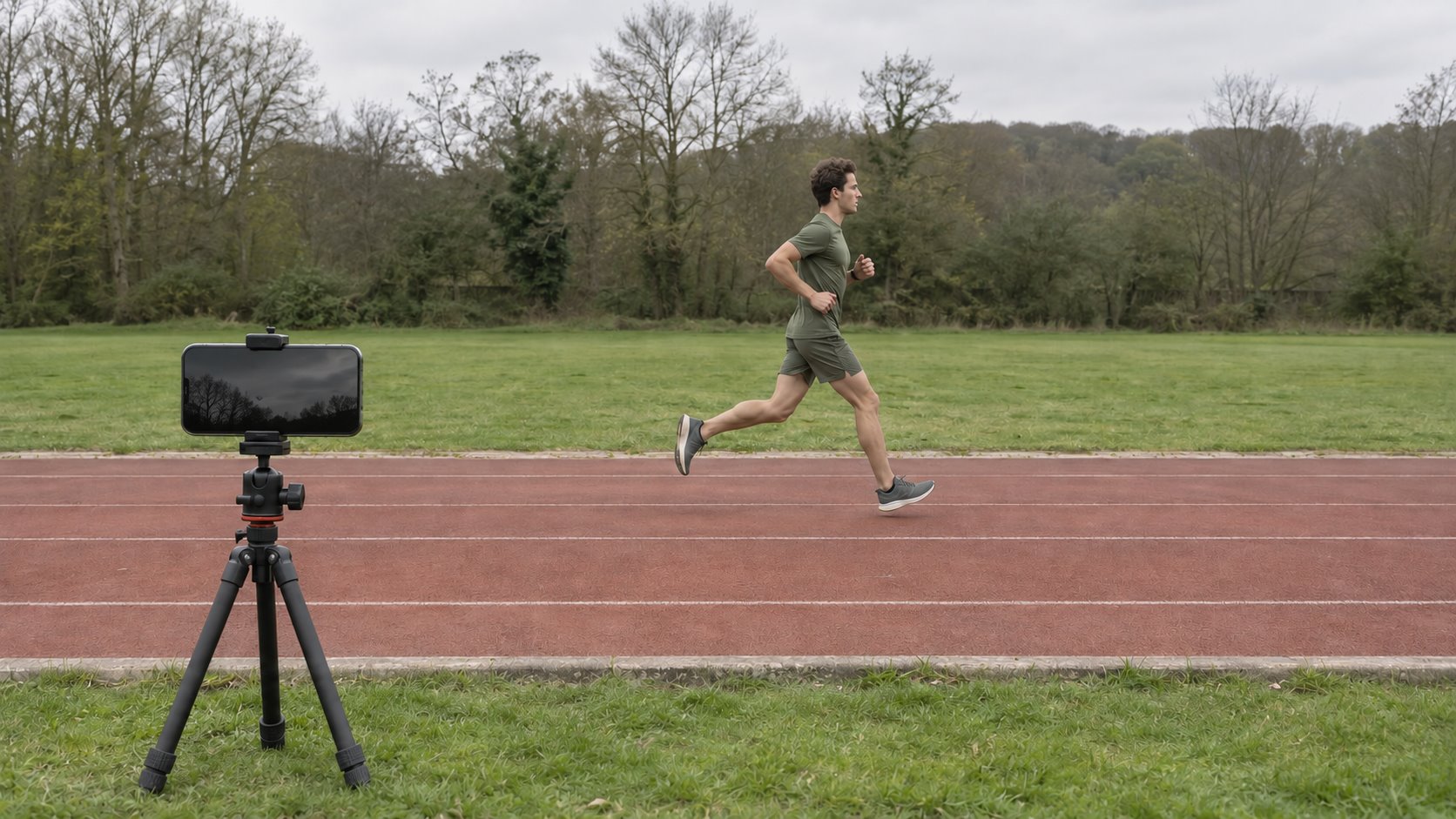
- Start from the side. Set the phone on a stable surface or tripod and point it across the direction of travel. Keep the runner's full body, shoes, and the ground in view for several consecutive steps.
- Add a rear clip if you need another view. Place the camera directly behind the runner with both shoes visible. Treat the two clips as separate views of the run.
- Match the setup for rechecks. Use a similar pace, surface, camera angle, and shoes. When you change something deliberately, write it down so you can interpret differences in the footage.
Running gait analysis FAQs
Can I check my running gait outside?
Yes. A steady outdoor video works for visual review in StrideReplay if the runner stays in frame for several steps. Choose a treadmill if you want repeatable speed and framing. StrideReplay's outdoor measurement accuracy is still being evaluated.
Can I use a photo instead of a video?
Use a video for a gait check. A photo can show posture at one instant. Cadence counts steps over time, and contact time requires seeing both touchdown and toe-off.
What is the best free running gait analysis tool?
Kinovea is the free pick for manual video analysis on Windows. For iPhone, Ochy is free to download with in-app purchases. Check what your intended report costs before starting.
When should I choose a video app or a wearable?
Choose a video app if you want to see how your body moves at a specific moment and review the clip with someone. Choose a wearable if you want step data across a longer outing without keeping a camera on the runner.
Already testing StrideReplay? Open the app on iPhone or iPad and start with one steady side clip from Photos.
See StrideReplay beta availability